

What You'll Need
- Hardware: A laptop or desktop with a working webcam.
- The Software: PictoBlox Web (No download required!) or the Desktop App for better performance.
- An Account: You’ll need a free account to access AI Credits. Most new accounts get 1,000 free credits—plenty for this project!
- Parent Reality Check: If you aren't a coder, play with it for 5 minutes first. The AI blocks are color-coded in purple, making them easy to spot.
Scratch vs. PictoBlox: Which Should You Choose?
What is PictoBlox?
In 2026, PictoBlox has evolved into a "web-first" platform (no more mandatory downloads!) that specializes in Machine Learning (ML). It allows kids to train their own models using their webcam—teaching them not just how to use AI, but how AI learns from data.
Dive In
Step 1: The Setup
- Open the PictoBlox Web Editor.
- Click the "Add Extension" button (bottom-left corner) and select Face Detection. Note: It may ask to sign in to use AI blocks.

Step 2: Prepare Your Stage
- Delete the default mascot (Tobi).
- Add a new Sprite—something expressive like a robot face or a colorful emoji.

Step 3: The "AI Brain" (The Logic)
- Start: Drag the
When green flag clickedblock. - Eyes On: Add
Turn video on stage with 0% transparency. - The Loop: Use a
foreverblock so the AI never stops "looking." - The Scan: Inside the loop, add
analyze image from camera. (This uses 1 credit per scan).

Step 4: Tracking & Feedback
- Move: Drag
go to x: (get x of face 1) y: (get y of face 1). Now the sprite will follow your head! - Speak: Add
say (get expression of face 1).
Step 5: Test it Out!
- Click the green flag. Smile, frown, or look shocked. Watch as your sprite identifies your emotions in real-time!
🌐 Beyond the Code: Where is this AI in the Real World?
Now that your child has seen how a computer "sees" their face, it’s the perfect moment to discuss the world around them. AI recognition isn't just in PictoBlox; it’s everywhere:
- At the Airport: Face scans are replacing paper passports to speed up boarding.
- At Hotels & Theme Parks: Some places use your face as your "key" to enter your room or unlock a fast-pass.
- As Payment: In some stores, you can "Pay with a Smile," linking your facial geometry directly to your bank account.
The "Parent Talk" on Privacy:
While these tools are convenient, they come with a trade-off. Ask your child: "If a computer can recognize you to let you into a hotel, does that mean it also knows exactly where you are and what time you were there?"
The Lesson:
AI recognition is a powerful tool for convenience, but it is also a tool for tracking. Teach your child that their face is "personal data"—just like their home address—and they should be mindful of where and when they choose to share it.
Ready to Go Deeper? Train Your Own AI from Scratch
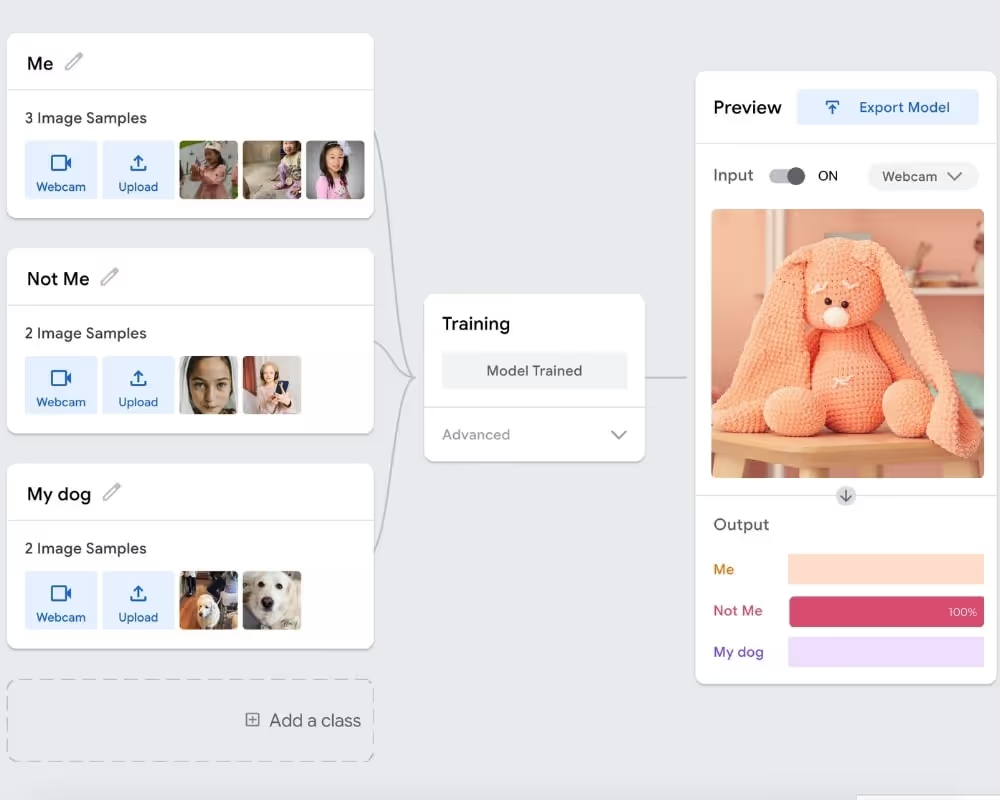
Face detection showed you how powerful pre-built AI can be — but what if your child could teach a computer to recognize anything they choose? That's exactly what machine learning is: training your own custom AI model from the ground up, using nothing but a webcam and curiosity.
Try one of these free 15-minute home experiments next:
- 🏃♂️ No-Code AI Movement Tracking → Train an AI to recognize your child's poses and gestures using Google Teachable Machine — no coding, no downloads
- 🐶 AI Puppy Detective: Image Recognition → Use your pet's photos to teach a computer to spot the difference between your dog and an imposter — a favourite first ML project for ages 6+

Over a decade helping students into top colleges. The acceptance letter isn't the finish line — it's just the beginning.
%20(300%20x%20250%20px)%20(1).avif)
-min.avif)